
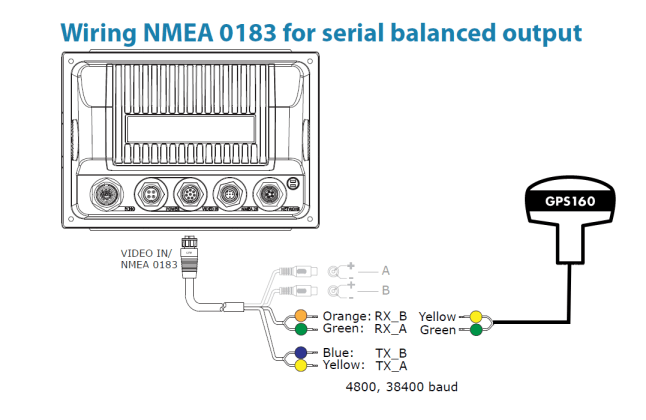
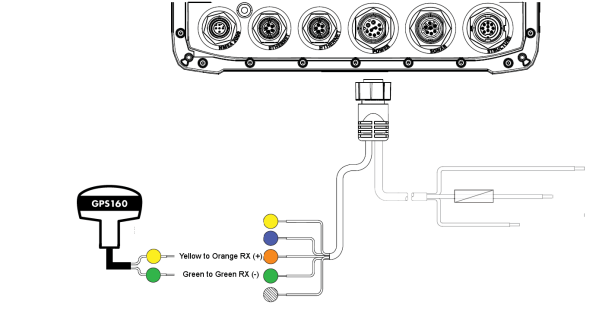
The B&G Zeus range of MFDs have just one NMEA0183 Port to connect the GPS160.
The port must output and input data at the same baud rate. Here is the wiring diagram:

Find out how to connect the GPS160 to your navigation system (chart plotter, fish finder, etc.).
The GPS160 is a high performance positioning sensor using GPS, Galileo and Glonass satellite systems for exceptional positioning accuracies and redundancies.
GPS160 is a perfect drop in replacements for any of the marine GPS antennas that are currently being used on boats. Whatever the make or model, the chances are that the GPS160 will be suitable.
Search the brand or/and part number of your system and you will find wiring diagrams which explain how to connect the GPS160 to your system.
The B&G Zeus range of MFDs have just one NMEA0183 Port to connect the GPS160.
The port must output and input data at the same baud rate. Here is the wiring diagram:

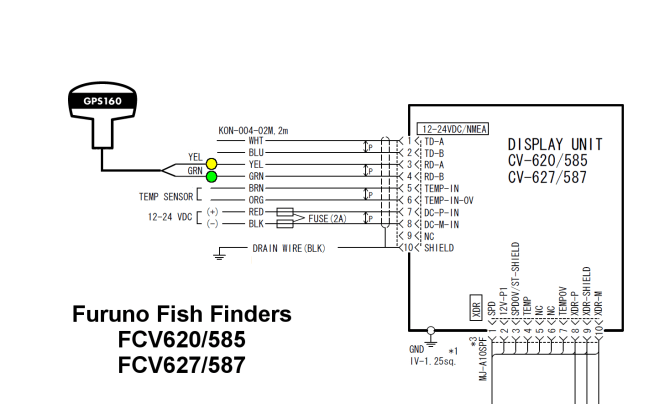
The Furuno FCV range of salt water Fish Finders all have an NMEA0183 output that can drive our GPS160.
The FCV585, FCV587, FCV620 and FCV627 all share the same wiring details for the Power/Data cable and the wiring diagram can be seen below.
It is important that you check that the Depth and GPS sentences are turned ON in the Installation>NMEA menu.

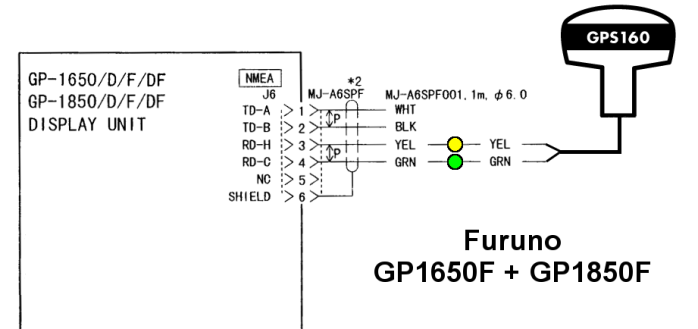
The GP1650F and GP1850F were popular salt water echo sounders, particularly in the US and have subsequently been superseded by the GP1670F and GP1870F units that only have an NMEA2000 interface (needs NMEA 2000 to WiFi server NavLink2 for those units).
Both the GP1650F and GP1850F have an NMEA0183 output that our GPS160 can be connected to as shown by this wiring diagram:
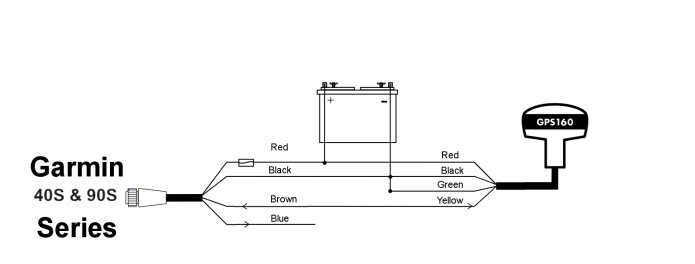
The Garmin 40S & 90S only have one NMEA 0183 port. Here’s the wiring diagram to connect a GPS160 to a Garmin 40S or 90S:
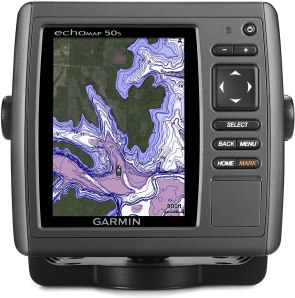
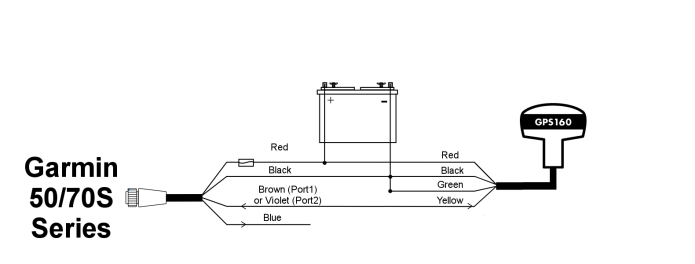
The Garmin 50s and 70s have two NMEA 0183 ports and you can connect the GPS160 to either input.
Here’s the wiring diagram to connect our GPS160 to a 50S or 70S:
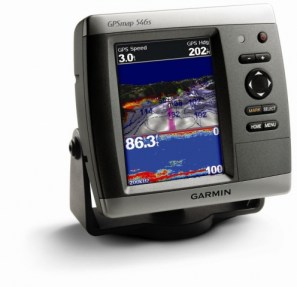
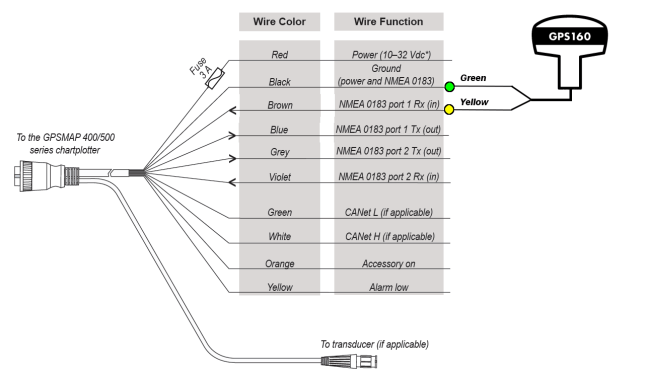
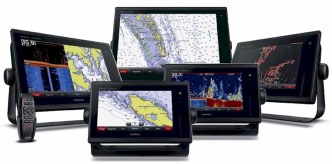
The Garmin 400 and 500 series plotters are some of the most popular small boat chart plotters on the market and it is not surprising that we get many enquiries about how to connect our products to them.
The Garmin 400 & 500 Series have two NMEA 0183 ports.
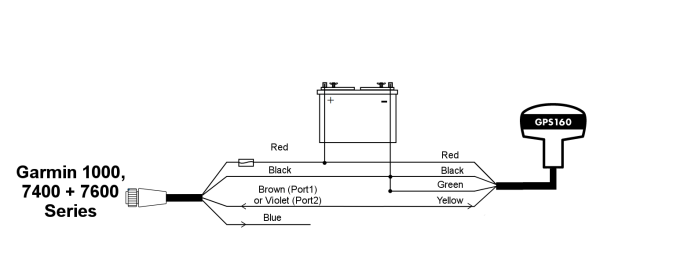
The Garmin 1000, 7400 and 7600 series only have one NMEA 0183 port.
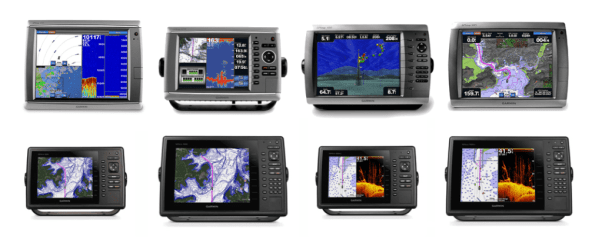
All Garmin MFDs have at least one NMEA0183 Output for connecting to our GPS160.
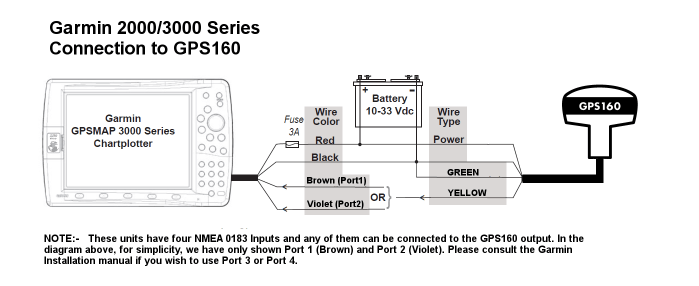
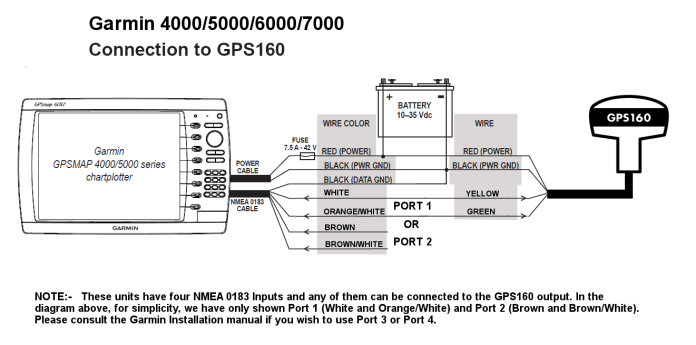

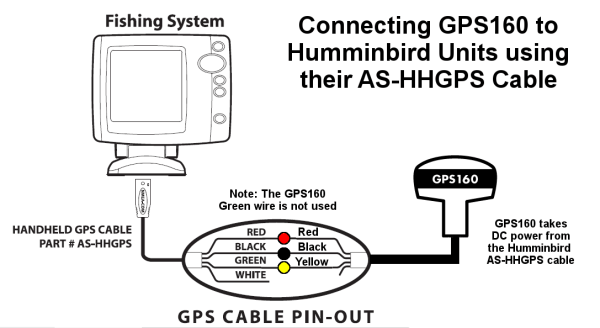
To connect our GPS160 to your Humminbird unit, you will need the optional AS-HHGPS Cable Kit (P/No. 700030-1) that connects to the rear of the unit.
Make sure that the NMEA Output is set to ON in the Advanced Setup menu of the Humminbird unit.
Here is a wiring diagram showing how to connect our GPS160 to the AS-HHGPS cable.
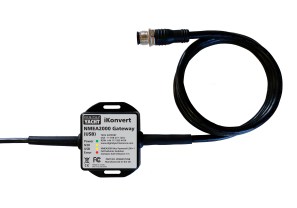
Most of the major marine electronics manufacturers now produce NMEA2000 GPS sensors but with the NMEA 2000’s 6m length limitation on drop cables, plus the relatively large NMEA 2000 connectors that these cables have, installation of NMEA 2000 GPS sensors can be quite difficult.
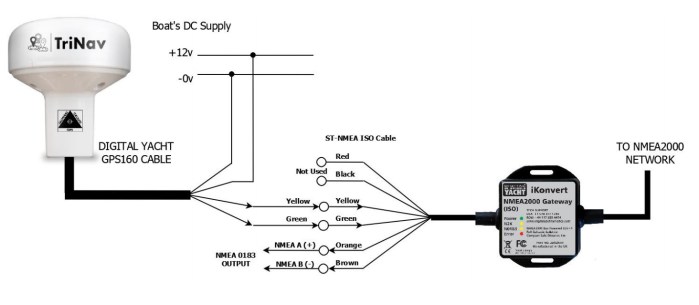
Where longer cable runs are required or space to fit cables is tight, we recommend using our GPS160 with one of our popular iKonvert NMEA 0183 to NMEA 2000 gateways. The GPS160’s slim 10m cable can be easily extended up to 45m and with no connector to worry about, can be easily run through existing conduits and tight spaces. Once you arrive at the NMEA 2000 network “backbone”, simply wire the GPS160 to Digital Yacht’s iKonvert ISO gateway (as shown below) and the GPS160 data will immediately be available on the NMEA 2000 network.
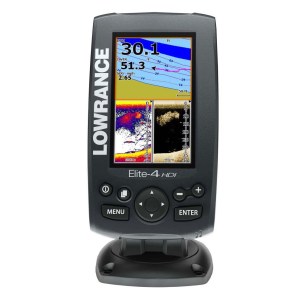
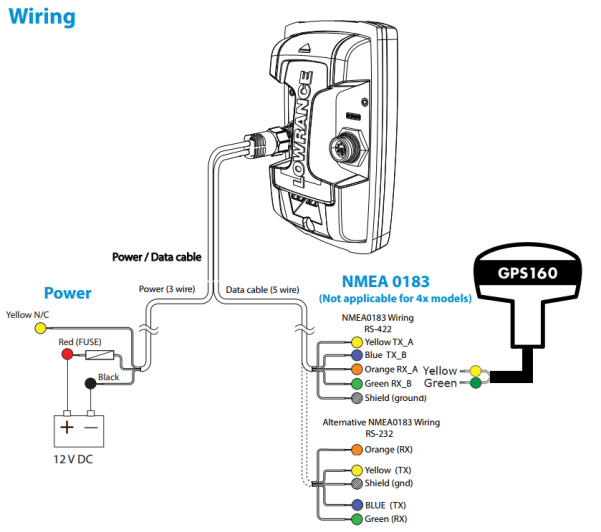
The Lowrance Elite 4 Fish Finder can be configured to have one differential NMEA0183 Port (RS422 mode) or two common ground NMEA0183 Ports (RS232 Mode). You can connect the GPS160 in either mode.
The port must output and input data at the same baud rate.

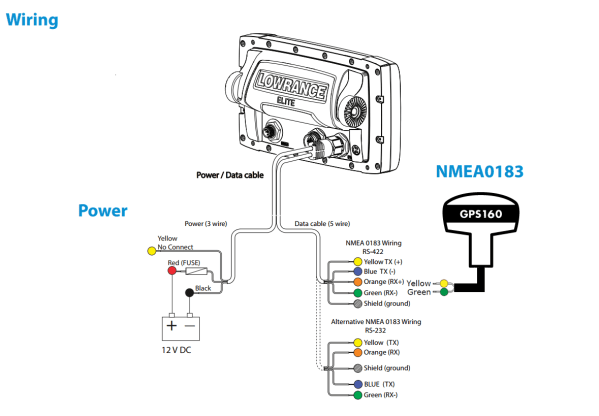
The Lowrance Elite 5 Fish Finder can be configured to have one differential NMEA0183 Port (RS422 mode) or two common ground NMEA0183 Ports (RS232 Mode). You can connect the GPS160 in either mode.
The port must output and input data at the same baud rate.

The Lowrance HDS range of Multifunction displays is on its third generation and all units feature a single NMEA0183 Port that our GPS160 can connect to.
The port must output and input data at the same baud rate.
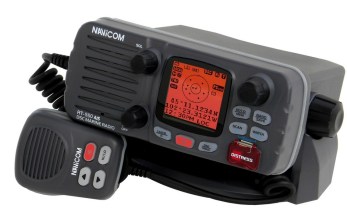
Navicom’s RT450, RT550 & RT650 VHF radios all have NMEA0183 input and output. You can use the NMEA output to connect the radio’s AIS to a plotter or NMEA to WiFi server.
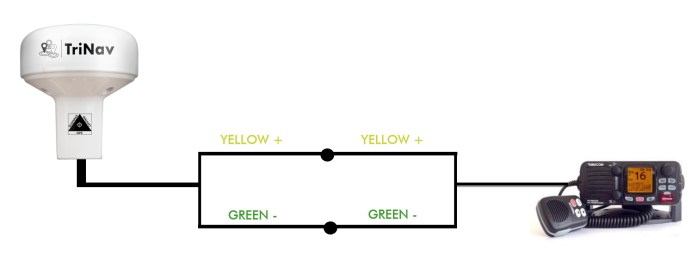
On the NMEA input, you can connect the GPS160 antenna:
Navicom’s RT450, RT550 & RT650 VHF radios all have NMEA0183 input and output. You can use the NMEA output to connect the radio’s AIS to a plotter or NMEA to WiFi server.
On the NMEA input, you can connect the GPS160 antenna:

Not to be confused with the latest touch screen a65 MFD, the original A60 and A65 units both had an NMEA0183 output that can be connected to our GPS160 antenna.
The wiring is the same for both units and a diagram can be found below.
The port must output and input data at the same baud rate
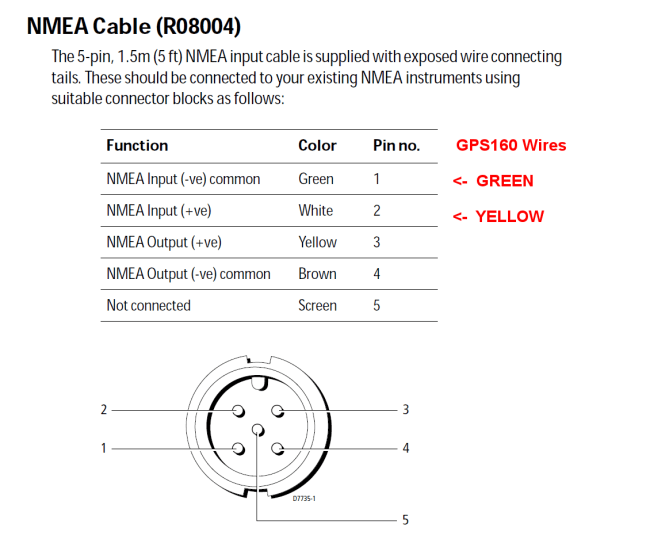

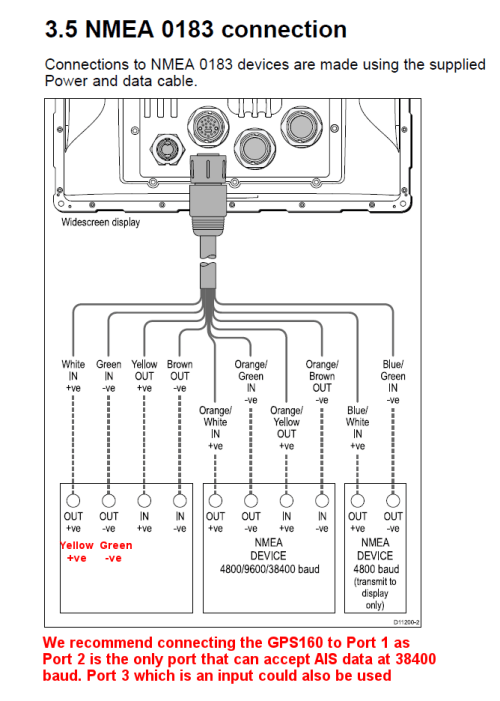
The C + E Series Widescreen Multifunction Displays had three NMEA0183 Ports, although only two of the ports were bi-directional (input and output), the third port only having an input.
It should also be noted that only one of the two bi-directional ports could be set to the high speed 38400 baud rate for AIS, so it is best not to connect the GPS160 to this port, if you intend to fit an AIS unit at a later date.
We recommend fitting the GPS160 to Port 1 as shown in the wiring diagram here.

The Classic C + E Series plotters had just one NMEA0183 Port to connect the GPS160.
The port must output and input data at the same baud rate.
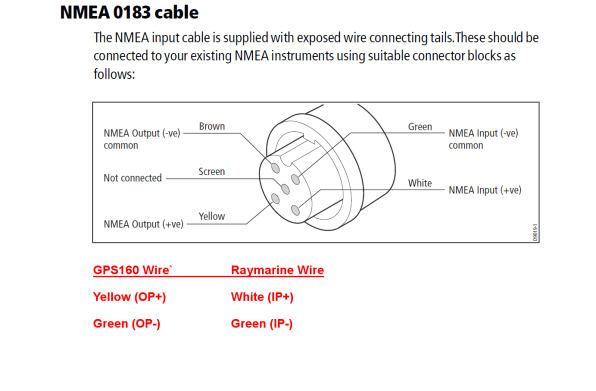

Most of the latest Raymarine C and E Series Multi-Function Displays have an NMEA0183 Output that can connect to our GPS160.
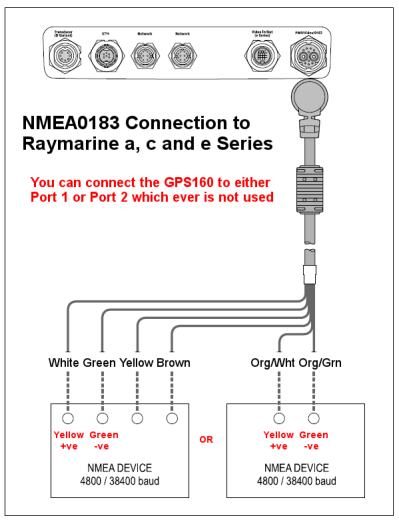

The Raymarine Ray 50, Ray 52, Ray 60 or Ray 70 VHF radio has a SeaTalk NG (NMEA 2000) and NMEA 0183 interface.
Through its internal DIP switches, you must configure the GPS160 at 38400 baud.
Here is the wiring diagram:

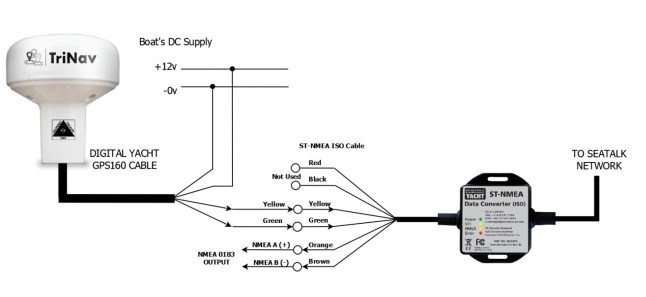
Many of our GPS sensors are sold to replace failed Raymarine GPS sensors Raystar 112, 120 and 125, which used the proprietary Raymarine SeaTalkâ„¢ interface. In most situations, you can find a spare NMEA 0183 input in the Raymarine system, to connect our GPS160 to, but if the only option is to connect it via SeaTalkâ„¢ then you can use a Digital Yacht ST-NMEA converter connected as follows.
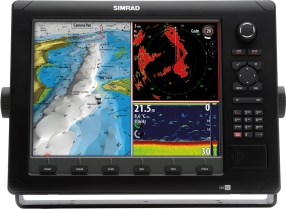
The high end Simrad NSE systems have a single NMEA0183 port that can be connected to our GPS160.
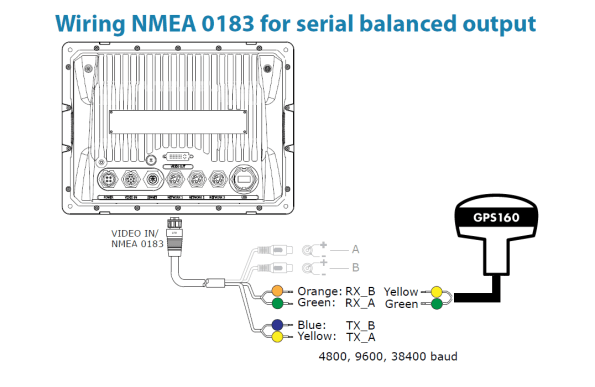

The high end Simrad NSO systems have a single NMEA0183 port that can be connected to our GPS160.
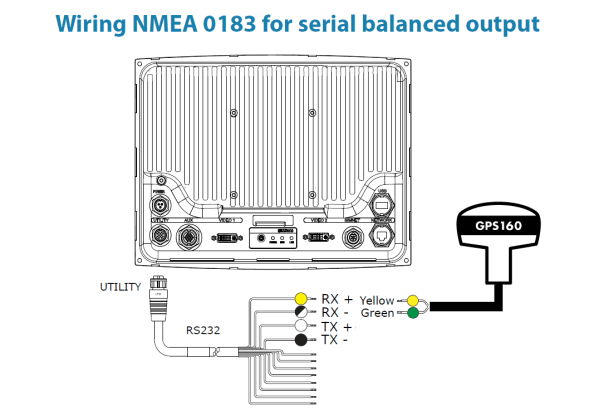
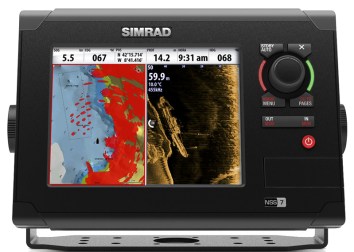
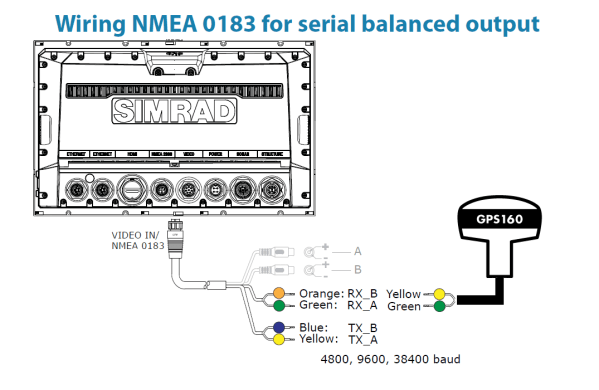
The Simrad NSS has just one NMEA0183 Port to connect the GPS160 to.

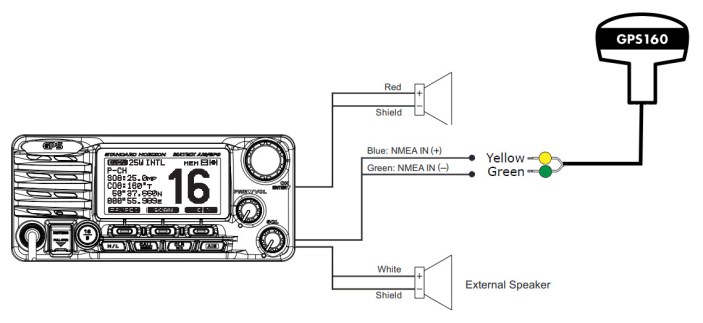
The VHF radio Standard Horizon GX2200 has two NMEA interfaces. To receive the GPS data from our GPS160 antenna, you must set up the VHF radio NMEA output at 4800 baud. This is explained in the VHF radio manual.
Below the wiring diagram which explains how to receive the GPS data from our GPS160 to the radio:
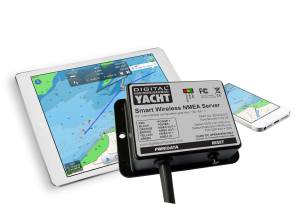
The GPS160 can be used wirelessly to send GPS data to an iPad/iPhone or Android device by using one of Digital
Yacht’s WLN10SM Wireless NMEA Servers. The GPS160 should be connected to the WLN10SM as shown in the
diagram below.
